Live on SaaSHive! EasySwitch — Turn any spare computer into a wireless virtual second display

Hey Hive! EasySwitch is officially live today
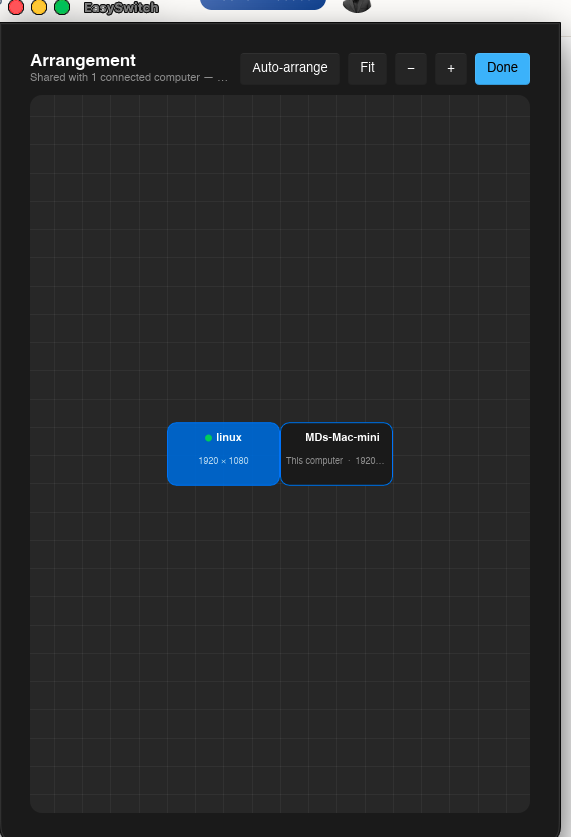
It's a lightweight app that unifies multiple Mac, Windows, and Linux computers into a single workspace — combining KVM control, virtual extended displays, clipboard sync, and file transfer.
What was hardest to get right: Optimizing the streaming pipeline to keep latency imperceptible over standard Wi-Fi while handling raw frame rendering locally, all without draining CPU or battery life.
Quick question for the community: When you manage multiple computers on one desk, what's your biggest pain point — juggling keyboards/mice, physical cable clutter, or transferring files between different operating systems? Would love to hear your setup hacks!
Comments (11)

Hi Sharif 🙋🏻♂️
If I install EasySwitch on my computer, then I can switch screens while still using the same computer? So it is something like Remote Desktop? 🤔
Thanks Sergey! 🙋🏻♂️ Not quite — EasySwitch is different from Remote Desktop.
It lets you use **one keyboard and mouse across multiple physical computers**, as if they were one setup. You can also use a **virtual display**, so another computer can act like an extra monitor on your desk, plus **cross-device clipboard and file transfer**.
So instead of remotely controlling another PC, you’re actually using your computers side-by-side from one workspace. 🙂
↳ Replying to Sergey Kargopolov
Easyswitch video:
drive.google .com/file/d/1dPuXjKDFpO9DS24JC8s0kAEJPCvg4ddP/view?usp=drivesdk
↳ Replying to Sharif
It does not open for me 🤷🏻♂️ why don't you post it on YouTube? 🤔 Or it is too early to share it publicly?
↳ Replying to Sergey Kargopolov
Link share not allow in free plan in this platform.
you can watch the demo on my x account /developersharif/status/2090741512137306443

This is a useful problem to tackle, especially because multi-computer setups get messy surprisingly fast.
For me, the biggest pain point would probably be context switching between devices rather than just the physical cables — moving the cursor to the wrong machine, copying something on one computer and realizing I need it on another, or constantly thinking about which keyboard/mouse is controlling what.
The cross-platform aspect is what makes EasySwitch especially interesting. A lot of existing solutions become much less convenient once the setup mixes macOS, Windows, and Linux.
I’d be curious about two things as you keep developing it: how noticeable the latency is during more demanding use cases like video, design work, or coding with lots of scrolling, and how seamless reconnection is when one of the machines sleeps or temporarily drops off Wi-Fi.
If those interactions become almost invisible to the user, I could see this being much more compelling than buying another monitor or constantly switching peripherals.
Thanks Jinny, you pretty much nailed the problem we’re trying to solve.
The goal is for the devices to feel less like separate computers and more like one workspace. Cursor movement and copy/paste should feel instant, and reconnection after sleep or a temporary network drop is something we’re actively working to make seamless.
For demanding use cases, EasySwitch runs locally over LAN, so we’re able to keep latency very low without routing anything through the cloud.
Really appreciate the thoughtful feedback. These are exactly the kinds of edge cases we want to get right.

I use a similar setup with a MacBook Air M3, one external monitor, and a second MacBook. Apple’s Universal Control lets me move the cursor between the two Macs and use the same keyboard and mouse, while the second machine still runs its own apps and uses its own computing power.
It works well inside the Apple ecosystem, so I’m curious: in which practical situations would EasySwitch give me a meaningful advantage over that setup? Is the main benefit cross-platform support, the virtual display, file transfer, or a more reliable LAN-based workflow?
I’d be especially interested in examples of how people use it day to day with separate workloads running on each computer.
If you’re fully in the Apple ecosystem, Universal Control is excellent — no argument there.
EasySwitch’s advantage is when you mix Mac + Windows + Linux or want more than input sharing: virtual display, universal clipboard, and file transfer, all directly over your LAN.
For example: Mac for development, Windows for testing, and Linux for servers/logs — one keyboard/mouse and seamless data sharing across all three.
So I’d say: Universal Control connects Macs. EasySwitch connects your whole workstation.
Thanks Sharif ,
that makes it completely clear. “Universal Control connects Macs. EasySwitch connects your whole workstation” is a very good way to put it.
From that perspective, it looks genuinely useful, especially for developers and technical teams running separate workloads: a Mac for development, Windows for testing, and Linux for logs or servers — without juggling keyboards, mice, clipboards or file-transfer workarounds.
Thanks for the explanation. This is much easier to understand now, and it sounds like a very practical application for mixed-device setups.
Sign in to comment or upvote.